October 3, 2020 October 3, 2020 |
 345 views, 345 views,  0 comments 0 comments |
HOWTO| Adjust your power options ...
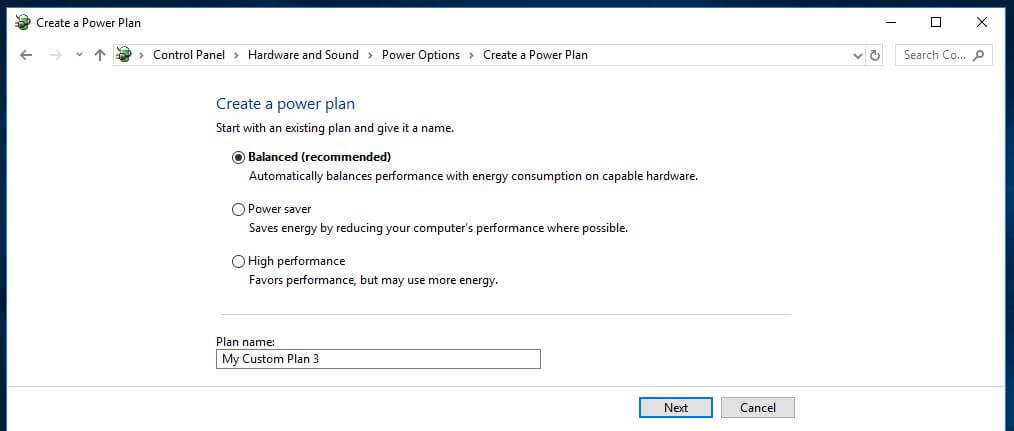
 Windows comes with several preset ‘power plans’ to suit your needs. The default is set to Balanced, which takes into account performance and energy consumption. But the latter is only really a concern if you’re running off battery or trying to keep the electricity bills down. As such, you may want to change your plan.
The Power saver plan option is not a good idea if your computer is already slow. This reduces the performance of your PC to save energy. As its name suggests, the High performance plan is a better option. Although it uses more energy, it favors performance so should help speed up your machine.
Aside from the standard options, you could choose to create your own custom plan. Go to Control Panel/Hardware and Sound/Power Options/Create a power plan. Enter your plan name and select Next.
Alternatively, you can start with an existing plan and adjust accordingly. To do this, go to Control Panel/Hardware and Sound/Power Options/Choose or customize a power plan and select Change plan settings next to an existing plan.
In both cases, basic options include how long the display stays on for when you’re inactive and how long before the computer goes into sleep mode. These won’t really affect your computer’s speed, but if you go into Change advanced power settings, you can make more adjustments that will have an impact.
|
 Comments 0 Comments 0
There are no comments ......
 Note: Note:
Guests comments are allowed ...
|
|
|
|
|
|